
A website blocker that runs on Pomodoro
Start a focus session and YouTube, Reddit, X and whatever else pulls you away stay closed until your break. Then they open again, with nothing to switch off or undo.
FreeNo account neededYour browsing stays on your computer
Willpower is the wrong tool for this
Nobody opens YouTube in the middle of a report on purpose. It is a reflex: a hard sentence, a slow build, a loading page, and your hand is already typing the address. By the time you notice, twenty minutes are gone.
Blocking those sites forever doesn't work either, because you still want them on your breaks and in the evening. So you turn the blocker off, and it never comes back on.
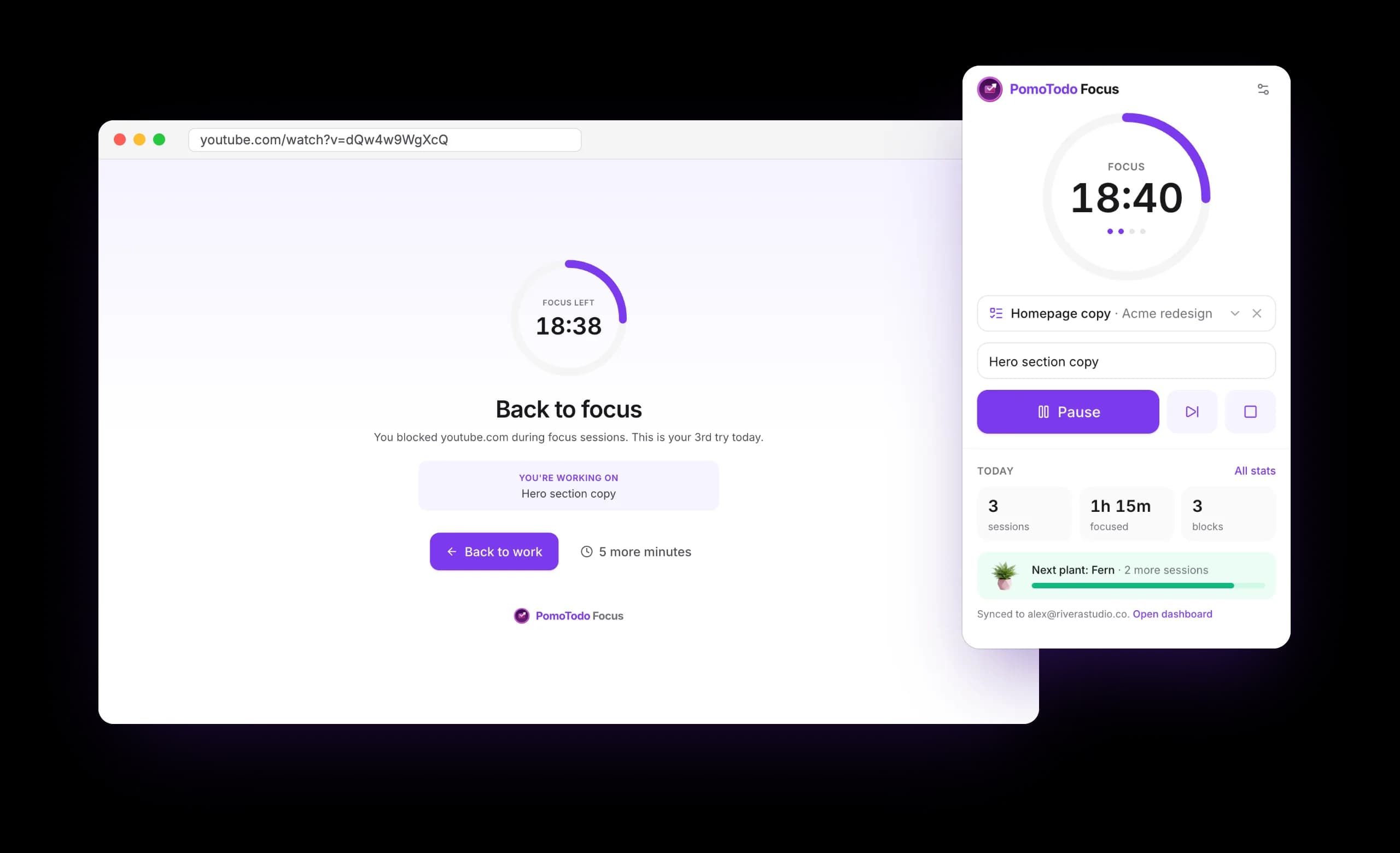
PomoTodo Focus ties the block to the timer instead. While a focus session runs, the sites you picked are closed. When the break starts, they open again. The reflex hits a calm page that shows how long is left and what you said you were working on, and most of the time that is enough to go back to it.
Pomodoro timer
A focus timer one click away
Pick 25/5, 50/10, 52/17 or 90/20, or set your own lengths. Type what you're working on, start, and the minutes left sit on the toolbar icon where you can see them without opening anything.
A soft chime and a notification tell you when the session and the break end. Breaks can start on their own, and every fourth one is longer on the classic rhythm.

Block lists
Block the feed, keep the site
Some sites are work and a trap at the same time. Turn on YouTube Shorts or Instagram Reels and only the endless feed is blocked, even when you tap into it from inside the app. The rest of the site stays open.
Block whole sites in a click from ready-made groups for social, video, news and shopping, or a single section like reddit.com/r/all. Anything you never want during the day goes on the always list.

Free PomoTodo account
Every session in your dashboard
The extension works on its own. Connect a free PomoTodo account and every session you finish lands in your dashboard too, from every computer, and grows your plant garden as the sessions add up.
Pick a task from your projects before you start, and the time counts on that task. If you bill by the hour on PomoTodo Pro, it shows up on your timesheet with the note you typed.

Stats
See where your focus went
Today's sessions sit in the popup. The stats page adds the week, the month, a two-week chart and the sites that tried hardest to pull you away, which is usually a surprise.
Export every session as a CSV whenever you like. It is your data, kept on your computer.

Details
Small things that keep you honest
Strict mode
No pausing, no stopping and no extra minutes until the session ends. Three hours at most.
Five more minutes
Need a site for real? Take five minutes from the block page, then it's blocked again.
Open tabs too
Tabs already sitting on a blocked site switch to the focus page the moment a session starts.
Chime and badge
Minutes left on the toolbar icon, a soft chime and a notification when a session or break ends.
Follows your profile
With Chrome sync on, your block lists and settings come with you to your other computers.
Nothing to track you
No ads, no analytics, and no web address ever leaves your browser.
Set up in under a minute
Step 1
Add it to Chrome
Free from the Chrome Web Store. A short welcome page opens on its own.
Step 2
Pick your distractions
Tap the sites that pull you away, or add your own, Shorts and Reels included.
Step 3
Start a session
One click on the toolbar icon. 25/5 is the classic, or pick a longer rhythm.
Step 4
Break, then repeat
Your sites open again on the break and close again when you're back.
A blocker that doesn't watch you
- Your block lists, settings and history stay in your browser
- Page addresses are checked against your list on your computer and never sent anywhere
- Chrome asks before the extension can show its page on a site, one site at a time
- No ads, no analytics, nothing sold. Connecting an account sends only your finished sessions
The details are in the privacy policy.
Questions
Is PomoTodo Focus free?
Yes. Blocking, the Pomodoro timer, strict mode and your stats are all free, with no account and no ads. A free PomoTodo account is optional and only adds syncing your sessions to the dashboard.
Does it block sites all the time?
Only if you want it to. Sites on the focus list are blocked while a focus session runs and open again when your break starts. Anything you never want during the day goes on a separate always list.
Can I block YouTube Shorts but keep the rest of YouTube?
Yes. Turn on YouTube Shorts or Instagram Reels and only those feeds are blocked, including when you tap into them from inside the app. You can block any section of a site the same way, like reddit.com/r/all.
What if I really need a blocked site during a session?
Take five more minutes from the block page, and the site is blocked again when they run out. If you know you'll abuse that, turn on strict mode: no pausing, no stopping and no extra minutes until the session ends.
What does it do with my browsing?
Nothing leaves your computer. The extension compares the address of pages you open with your block list inside your browser, and never records your history. Chrome asks you before it can show its own page on a site, one site at a time.
Does it work in Edge or Brave?
Yes. It installs from the Chrome Web Store into Chrome and other Chromium browsers, including Microsoft Edge and Brave.
What happens when I connect a PomoTodo account?
Every focus session you finish is saved to your free dashboard, where it counts toward your statistics and grows your plant garden. You can also pick a task from your projects, so the time lands on that task and, on Pro, on your timesheet.
Make the next session count
Add PomoTodo Focus to Chrome, pick the sites that pull you away, and start your first 25 minutes.
Already use PomoTodo? Create a free account or connect the extension to keep every session.