
The short version
- Your effective hourly rate is what a project actually paid you for each hour you really worked on it.
- Worth is the PomoTodo report that works this out for you. It also shows billable value, unbilled money, how much of the budget is gone and how good your estimates were.
- It builds itself from the focus sessions you already track. No spreadsheet, no formulas.
Picture a fixed price job. A logo and some packaging labels for a small bakery, $4,500. It feels like a great deal. Then the feedback rounds start. And keep going.
By the time someone finally adds up the hours, the "great deal" is paying far less per hour than a normal rate. And nobody noticed while it was happening. That's the problem Worth solves. It tells you what the time is worth while you can still do something about it.
What is an effective hourly rate?
Here's the simple version. Take what a project paid you and divide it by the hours you spent on it.
Effective hourly rate = money earned ÷ hours worked
So if a job pays $4,500 and takes you 34 hours, your effective rate is about $131 an hour. If the same job drags on to 50 hours, it drops to $90 an hour. Same money, more time, smaller rate.
On hourly work this matters too. Every internal hour you spend on a client (emails, rework, admin) is time the client doesn't pay for, so your real rate on that client slips a little lower than the rate on your invoice.
Meet Worth
Open your dashboard, go to Projects, then Worth. Pick a project and a date range at the top.
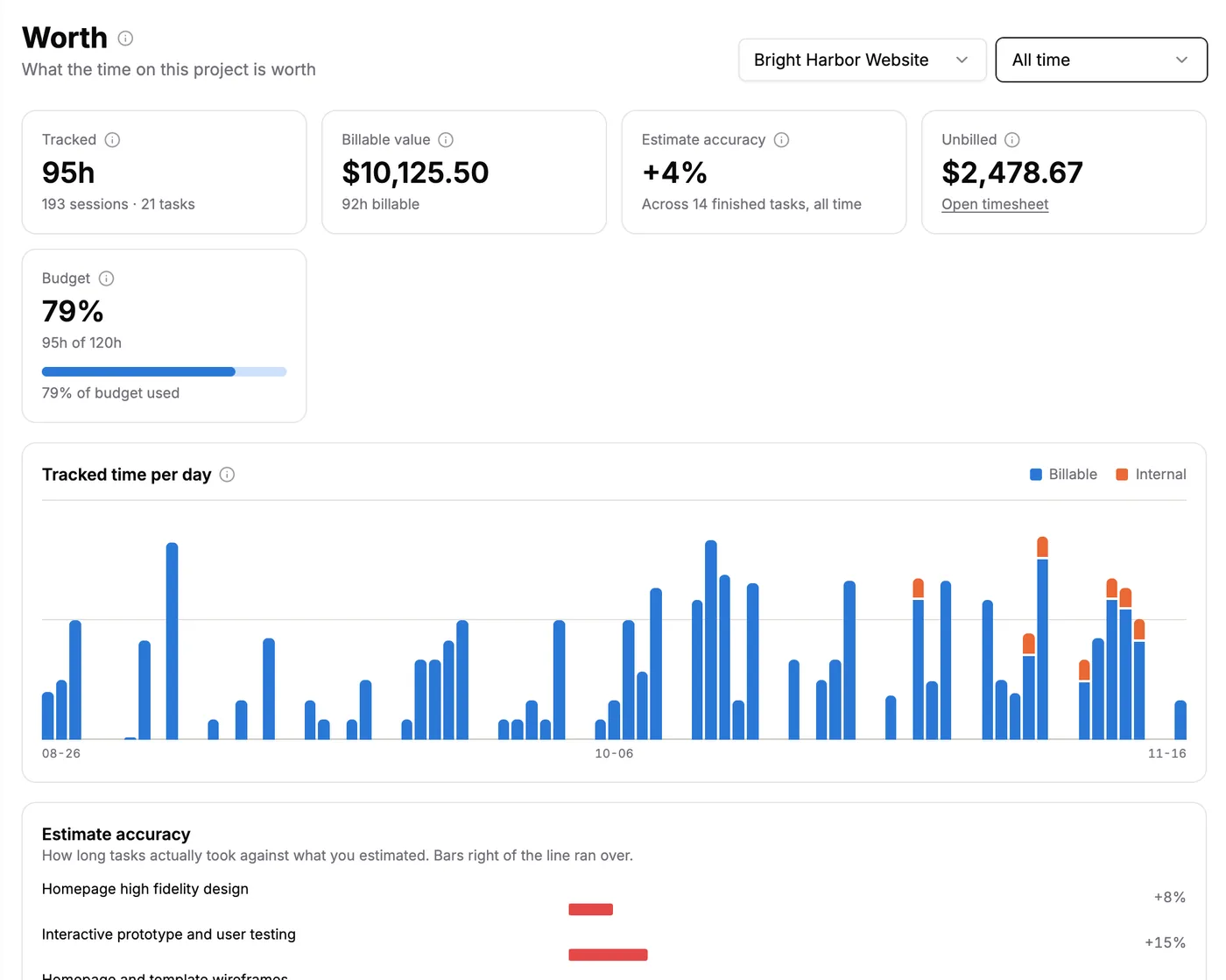
Worth for one client project, all time. Everything on this page came from focus sessions on the project's tasks.
The whole page is built from three things you already have: a project with a price, tasks marked billable, and focus sessions tracked against those tasks. If any of those is missing, Worth shows you a short checklist of what to set up.
The numbers at the top, one by one
The first row is where most people look first. Each card has a little info icon too, in case you forget what it means.
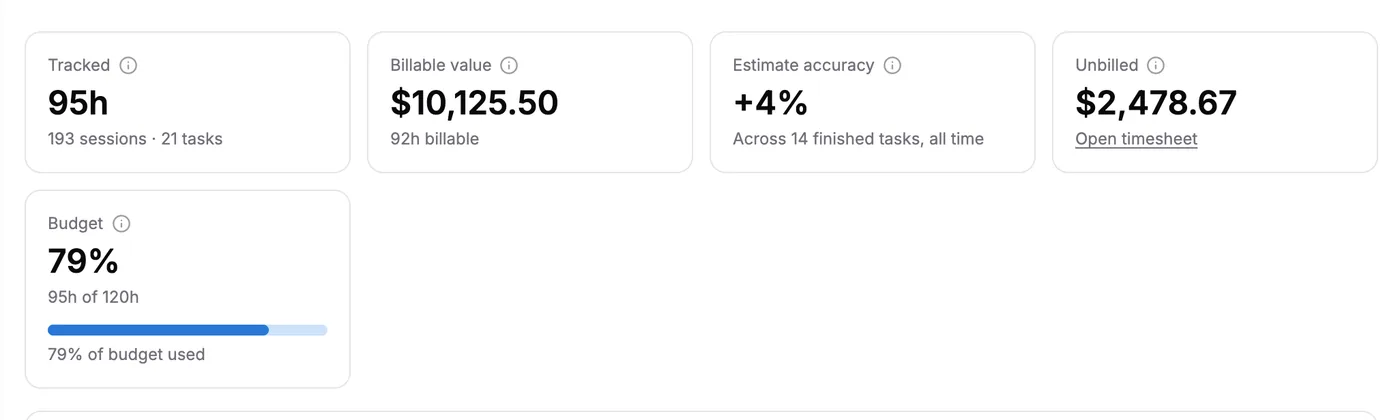
Tracked time, billable value, estimate accuracy, unbilled money and budget, side by side.
- Tracked is all the focus time on this project, plus the number of sessions and tasks behind it.
- Billable value is your billable hours times your hourly rate. Only tasks marked billable count here.
- Estimate accuracy compares the time your finished tasks took with what you guessed. A positive number means you ran over.
- Unbilled is billable work you have not marked as invoiced yet. It always looks at all time, because money you're owed stays owed.
- Budget shows how much of the project's time budget is gone, like 95 of 120 hours.
The budget bar is the one to watch most closely. Seeing 79% used while the work feels only half done is the early warning you want. It gives you time to talk to the client before the budget runs out, not after.
Fixed fee projects: your real rate, live
On a fixed fee project, the billable value card turns into Effective rate. This is the number from the bakery story.
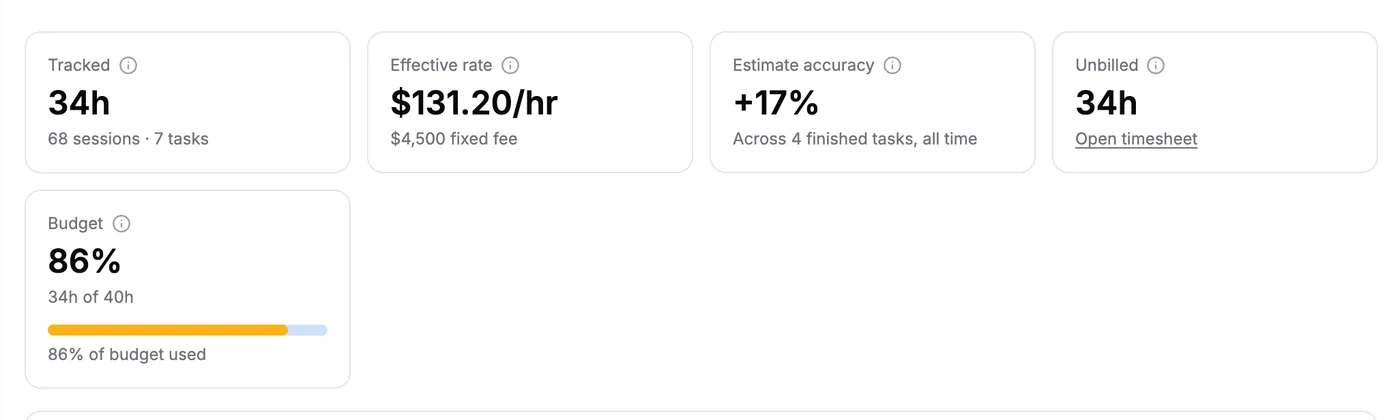
A $4,500 fixed fee job after 34 hours. Right now it pays about $131 an hour, and that number falls with every extra hour.
It's the fixed fee divided by every hour tracked, so it goes down the longer the project runs. Here's what that looks like for this one job:
- At 34 hours, it pays about $131 an hour.
- At 40 hours, about $112 an hour.
- At 50 hours, $90 an hour.
Seeing that while the job is still running changes how you handle feedback rounds. "Sure, one more round" sounds different when you know it costs you $20 an hour.
Tracked time per day
Below the cards is a chart with one bar for each day. Blue is billable time and orange is internal time.
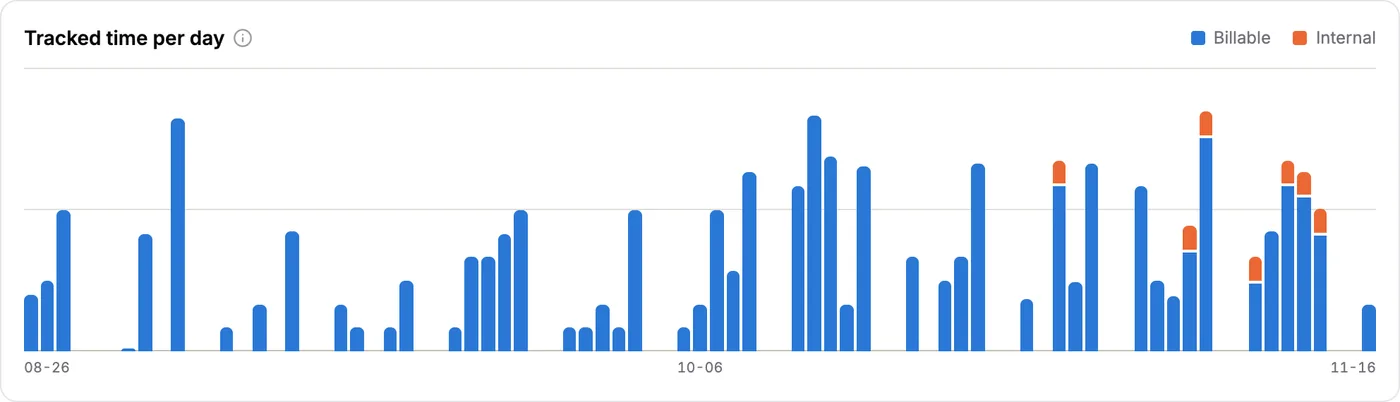
Each bar is one day. Orange is time you won't bill, like extra revision rounds.
It's a nice way to see the rhythm of a project. Busy weeks, quiet weeks, and the moment the internal orange starts creeping in. Lots of orange near the end of a project often means scope creep.
How good were your estimates?
The estimate accuracy chart takes every finished task that had an estimate and shows how far off it was.
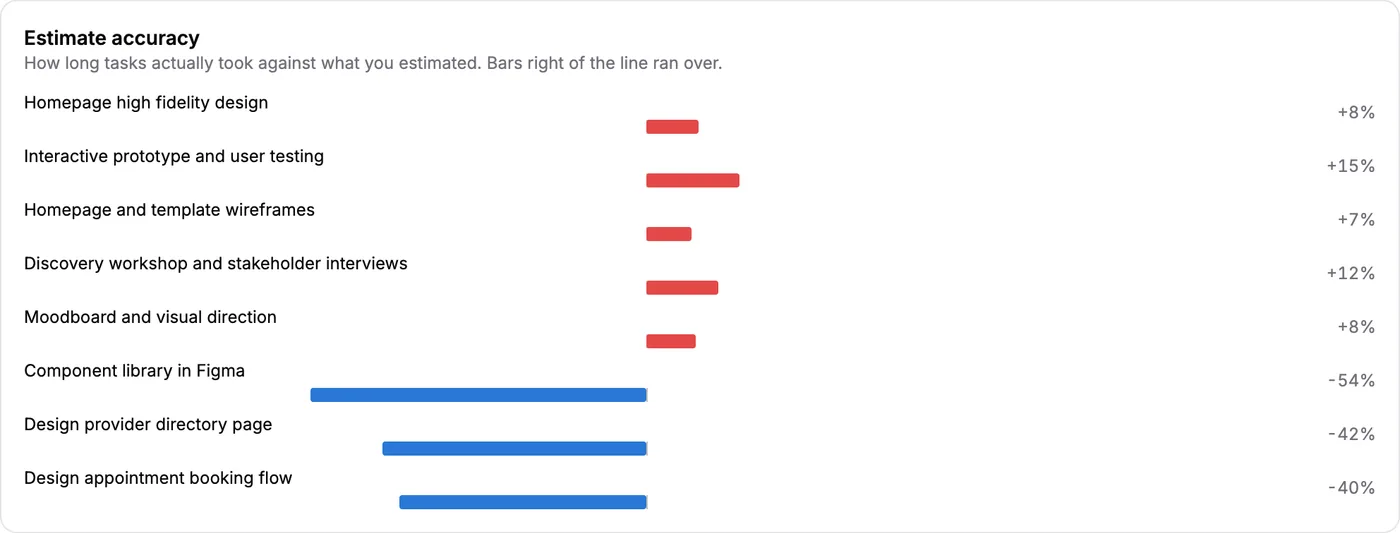
Bars to the right of the line ran over. Bars to the left finished early.
This is how you get better at quoting. If design tasks always run 10% over, you now know to add 10% to the next quote. No guessing, just your own history telling you the truth.
Every task, side by side
At the bottom is a table with every task that has focus time in the range. You see the tracked hours, the estimate, the number of sessions, and whether it's billable or internal.
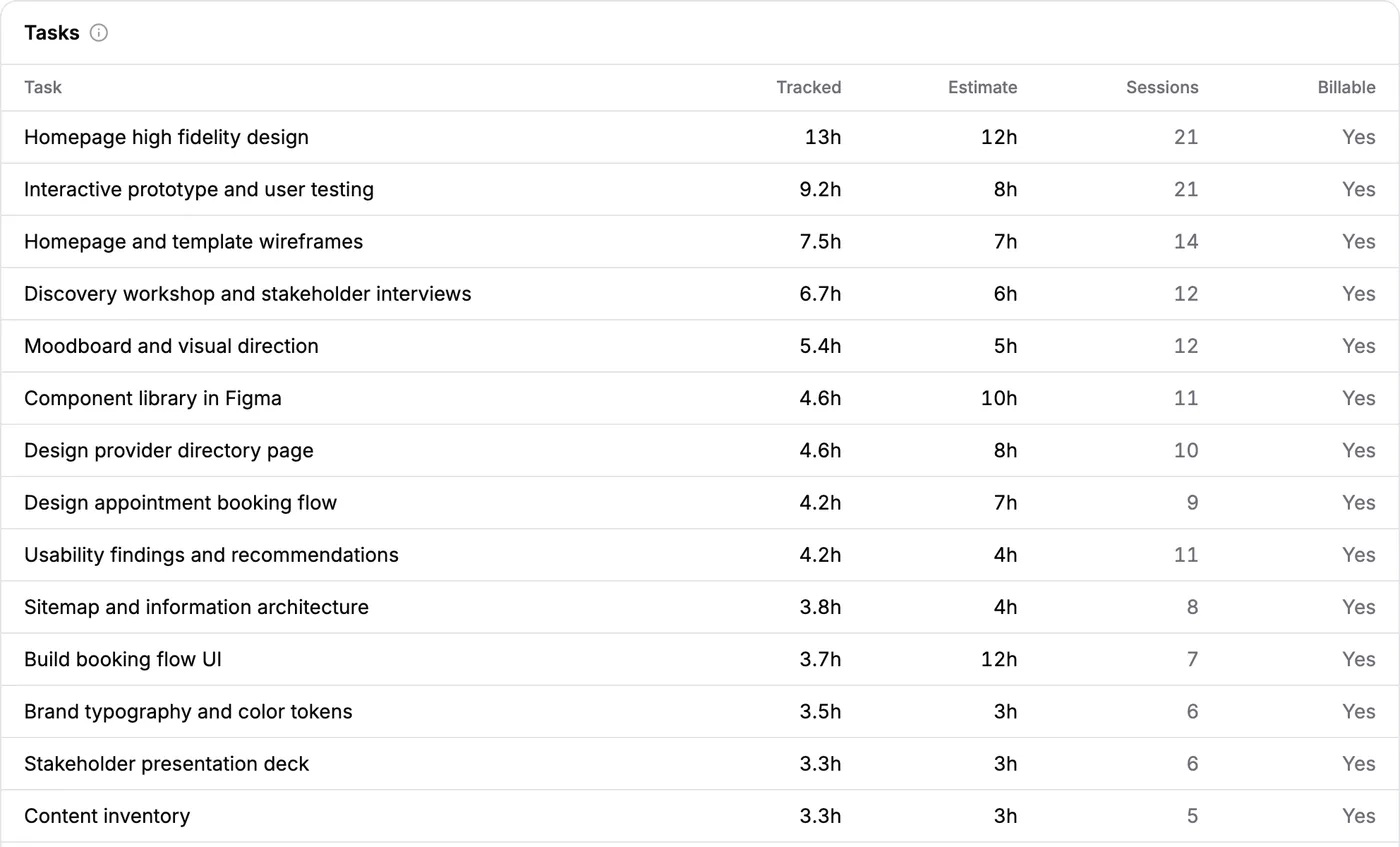
Sorted by time. The biggest tasks rise to the top.
It's the quickest way to answer "where did all the hours go?" when a client asks. Or when you ask yourself.
How to set up Worth in three steps
Worth needs a little setup the first time. After that, it fills in on its own.
- Put a price on the project. On the board, open "Billing & budget" and choose hourly or fixed fee. Add a time budget if you have one.
- Mark billable tasks. New tasks start as internal, so switch on Billable for the work the client pays for.
- Track time against tasks. Pick the task in the Pomodoro timer before you start, or press "Focus on this" on the task.
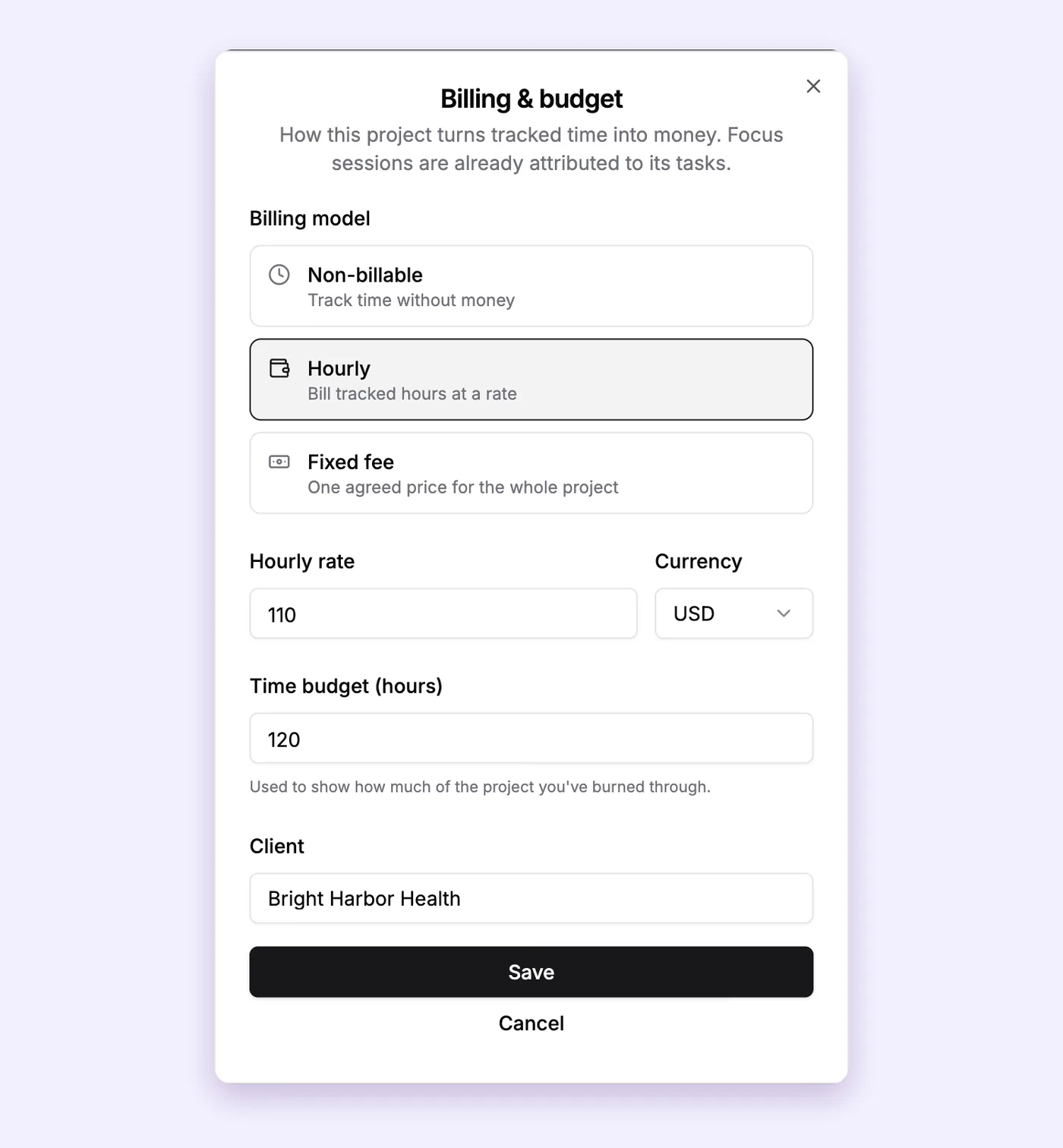
Step 1 happens here. One dialog for the billing model, the rate, the currency, the budget and the client.
If the board is new to you, the project board guide walks through tasks, estimates and the billable switch.
Turning the numbers into better decisions
A report only helps if it changes what you do. Some ways to put Worth to work:
- Raising rates. If your effective rate on a client keeps landing under your normal rate, the price is too low. You now have proof, not a feeling.
- Better quotes. Your estimate accuracy shows how much padding your quotes need.
- Scope talks. Watch the budget bar. At 70 or 80 percent, it's time for a friendly chat with the client.
- Chasing money. The unbilled card is your reminder to send the next invoice. Here's how to make an invoice when it's time.
And if you're running several clients at once, compare their Worth pages side by side. It's a calm way to see which projects deserve more of your week. This guide on managing multiple projects has more on that.
What is free and what is Pro
On the free plan you see Worth on your own projects with the hours and estimates showing, for the last 7 or 30 days. The money figures are blurred.
Pro ($12 a month or $99 a year) shows the money: billable value, effective rate and unbilled amounts, plus longer ranges like 90 days, 12 months and all time. Only owners and admins of a workspace can see Worth, so your rates stay private from the rest of the team.
Free calculators that pair well with Worth
- Not sure what your rate should be? The freelance rate calculator works it out from the year you want.
- Want to see the money from the other side? Try the profit margin calculator.
- Curious what an hourly rate means over a year? The hourly to salary calculator shows it.
FAQs
What is an effective hourly rate?
It's the money a project paid you divided by the hours you actually worked on it. It shows what your time was really worth, which can be quite different from the rate you quoted.
How do I calculate my effective hourly rate?
Divide what you were paid by the total hours you spent, including the hours you did not bill. For example, $4,500 for 34 hours is about $131 an hour. PomoTodo Worth does this for you on every fixed fee project.
Is a fixed fee better than charging by the hour?
Neither is always better. A fixed fee can pay very well if you work efficiently, and very badly if the scope grows. Hourly is safer but caps what you can earn. Tracking your effective rate tells you which one is working for you.
What does budget used mean in Worth?
It's the share of the project's time budget you have already tracked. If you set a budget of 120 hours and you have tracked 95, the budget is 79% used.
Why is my effective rate lower than the rate I charge?
Usually because of internal time. Calls, emails, rework and admin all take hours that never reach the invoice. Worth counts them, so your effective rate shows the full picture.
Know what your time is worth, while it still matters
Most people find out what a project paid them after it's over. Worth shows you during the project, when a conversation can still change the outcome.
Start by tracking one client project properly for a couple of weeks. The billable hours guide is the best place to begin.